# iPhone Battery Health After Replacement: Unknown Part, Diagnostic TI Batteries and Genuine Service Packs
Short answer: iPhone battery health disappears after replacement because iOS cannot verify the new battery as a genuine Apple part linked to that phone. It then shows "Unknown Part" or an "Important Battery Message". Diagnostic (TI-solution) batteries usually restore a health reading, while only genuine Apple batteries completed through Repair Assistant can show "Genuine".
Every repair shop doing iPhone battery replacement has had the same conversation. The customer comes back two days later, opens Settings, and asks why their iPhone battery health after replacement says "Unknown Part" or shows no percentage at all. The battery works. The phone charges. But the customer now thinks the shop installed something fake.
This explainer covers why the message appears, what Apple's parts pairing and Repair Assistant actually change, how diagnostic-compatible "TI solution" batteries differ from standard aftermarket and genuine service packs, and how to explain each option to a customer before the repair, not after.
Why does my iPhone say "Unknown Part" after a battery replacement?
Parts pairing is Apple's system for checking that a replacement part is a genuine Apple component and has been linked to that specific iPhone through Apple's repair process. When the check fails, iOS flags the part.
According to Apple's article About genuine iPhone batteries, iPhone XR, iPhone XS models and later show a parts and service history under Settings > General > About. The battery is marked Unknown if it is not genuine, is not functioning as expected, has not been verified and linked to the iPhone after repair, or has been modified. On iOS 15.1 or earlier, an Important Battery Message appears instead of the Unknown label.
Three points from Apple's own wording matter most for repair shops:
- Apple states the messages do not affect your ability to use your iPhone or your battery. The phone is not blocked or slowed because of the message itself.
- If iOS shows "Unable to verify this iPhone has a genuine Apple battery", Apple says the battery health information might not be accurate. On many models, shops see the Maximum Capacity figure hidden or replaced by a service notice.
- An Unknown label might affect the trade-in value of the device. Customers who plan to trade in their phone care about this.
Apple's iPhone Parts and Service History page explains that this section appears with iOS 15.2 and later, and lists four labels: Genuine (genuine Apple parts and processes), Unknown (not genuine, not working as expected or cannot be verified), Unverified (the logic board was previously replaced) and Used (the part was already installed in another iPhone).
In short, the message is about verification, not about whether the battery holds a charge. A high-quality aftermarket battery and a poor one can both show Unknown.
What changed with Repair Assistant in iOS 18?
Repair Assistant is Apple's on-device tool for finishing a repair: it verifies and calibrates a replacement Apple part and links it to the iPhone. It arrived with iOS 18 and changes the picture for genuine parts in two ways.
First, a genuine part no longer has to be paired by Apple's own service tools. Apple's guide Use Repair Assistant to finish an iPhone or iPad repair lays out the steps: update to the latest iOS, go to Settings > General > About > Parts & Service History, then tap Restart & Finish Repair. The phone needs Wi-Fi and more than 20 percent battery. Until the repair is finished, the part shows Finish Repair in the parts history.
Second, genuine parts can now move between phones. On iPhone 15 and later with iOS 18, Apple's battery article says a genuine battery previously used in another iPhone is labelled Used, and Apple notes it may not perform as well as a new one.
Repair Assistant does not turn a third-party battery into a genuine one. It is built to verify Apple parts. Supported parts also vary by model, so check Apple's table for the specific iPhone before promising a customer a "Genuine" label.
What is a diagnostic or TI-solution iPhone battery?
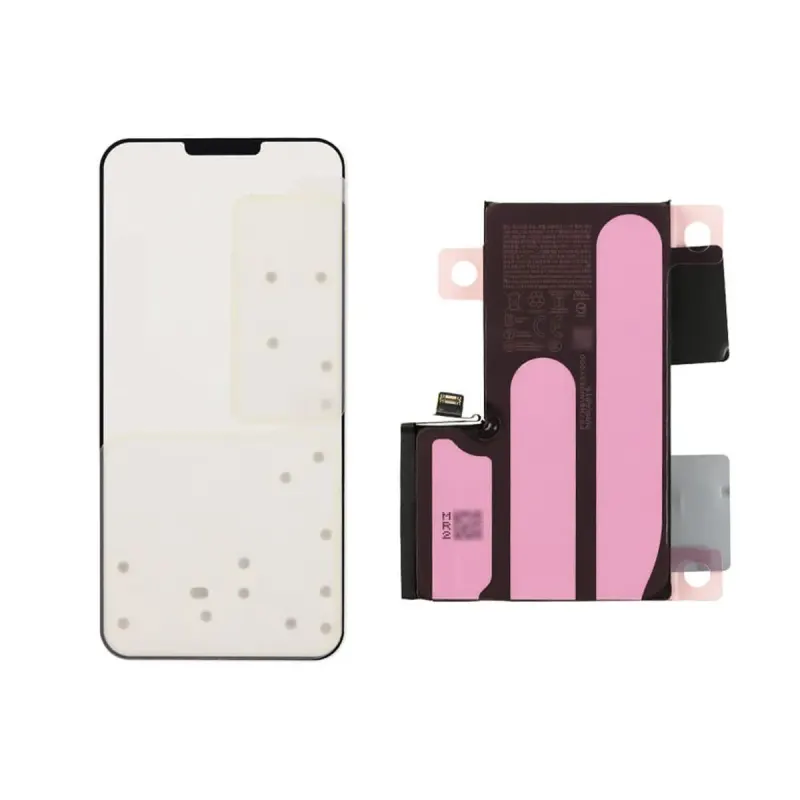
A diagnostic-compatible battery, often sold in Shenzhen as a "TI solution" battery, is an aftermarket iPhone battery whose battery management board is designed so iOS can read capacity and cycle data from it. The name refers to the fuel-gauge chip family used on the board. The aim is that Battery Health shows a Maximum Capacity figure after installation, without moving the original board or using a tag-on flex and programmer.
What a diagnostic battery typically does and does not do:
- Usually does: show a Maximum Capacity percentage in Battery Health, report cycle count, and support normal charging behaviour.
- Usually does not: pass Apple's genuine-part check. Parts and Service History may still show the battery as Unknown, because that check is tied to Apple's verification, not to the health readout.
- Varies: behaviour can change between iOS versions and between iPhone models. A battery that reports cleanly on one iOS release may behave differently after an update.
Treat "no message, full health, works on every iOS" claims with caution. Ask the supplier which iPhone models and which iOS versions a batch has been tested on, and test a sample yourself on a current iOS release before stocking it.
Genuine service pack vs diagnostic vs standard aftermarket
These are the three iPhone battery grades most Bangladesh repair counters deal with. The trade names are not regulated, so judge each SKU on what the seller will confirm in writing.
| What the customer sees | Genuine service pack | Diagnostic / TI-solution | Standard aftermarket |
|---|
| Battery Health percentage | Yes, once the repair is completed | Usually yes | Usually no |
| Parts and Service History | Can show Genuine via Repair Assistant where supported; Used if reclaimed (iPhone 15+, iOS 18) | Typically Unknown | Unknown |
| Message on screen | Finish Repair until completed | Unknown Part may remain | Unknown Part or Important Battery Message |
| Effect on use | None | None, per Apple's wording on the message | None, per Apple's wording on the message |
| Trade-in impact | Lowest | Possible | Possible |
| Relative cost | Highest | Middle | Lowest |
| Best fit | Newer iPhones, customers who care about Genuine status or trade-in | Most mainstream repairs where customers check Battery Health | Budget repairs and older models |
One more option exists: moving the original battery management board onto a new cell, or using a tag-on flex with a programmer. These methods need skill and tooling, carry their own risks, and their results depend on the iPhone model and iOS version.
If you also replace iPhone screens, the same verification logic applies to displays and cameras. Our guide to iPhone display grades: soft OLED, hard OLED and incell covers the display side, and our iPhone displays range lists grades per model.
How to explain iPhone battery health to customers
Most comebacks are an expectations problem, not a parts problem. Explain before you open the phone:
- Say what they will see. "With this battery, Settings may show 'Unknown Part'. Your phone works normally; Apple says the message does not affect use."
- Offer a choice. Price the genuine, diagnostic and standard options side by side, and say which one shows a health percentage.
- Mention trade-in. If the customer plans to sell or trade in the phone, recommend genuine.
- Set realistic battery expectations. Apple's iPhone battery and performance page says iPhone 14 and earlier batteries are designed to retain 80 percent of original capacity at 500 complete charge cycles under ideal conditions, and iPhone 15 batteries at 1,000 cycles. A new battery will not stay at 100 percent forever.
- Write it on the job card. Record the battery grade on the invoice so the customer and your technician know exactly what was installed.
A short script works well: "Genuine shows Apple's own health data and a Genuine label. Diagnostic shows a health percentage but may say Unknown Part. Standard is cheapest and usually shows no percentage. All three work normally."
Stocking iPhone batteries: what to check before you buy
For a parts wholesaler or a busy repair shop, a good iPhone battery batch is one that matches what was promised:
- Grade stated per SKU: genuine new, genuine reclaimed, diagnostic, or standard.
- Cycle count at or near zero when read with a battery programmer or test box.
- Recent production date codes, no swelling, no rework marks on the flex.
- A sample tested on a current iOS release to confirm what Battery Health and Parts and Service History show.
- Transport documents in order. Batteries are Class 9 dangerous goods; our phone battery import guide on UN38.3 and battery grades covers the shipping rules.
For the demand behind these SKUs, see our Bangladesh smartphone repair market 2026 analysis.
Where KHI fits in
K.H. Infinity (KHI) is a Bangladesh B2B importer of iPhone and Android replacement batteries sourced from Shenzhen (HS Code 8507.60.00), supplying repair shops and parts wholesalers with UN38.3 test summaries and MSDS provided per shipment and in-house NBR customs clearance. Our phone battery range covers iPhone 11 to iPhone 17 in clearly labelled grades, alongside Samsung, Google Pixel, Xiaomi, OPPO, Realme, OnePlus, Huawei, Honor and Motorola. Products carry CE and RoHS certification, and batteries can be combined with displays and other parts under our phone parts programme.
Send your iPhone model list and the grade mix you want through the quote form, or browse the phone battery catalogue. We confirm grade, documents and lead time for every SKU.
Frequently Asked Questions
Does "Unknown Part" mean the iPhone battery is fake?
Not necessarily. Apple shows Unknown if a battery is not genuine, is not working as expected, has not been verified and linked to the iPhone after repair, or has been modified. A genuine battery that was never completed through Apple's process can also show a warning, such as Finish Repair.
Will an aftermarket battery slow down or block my iPhone?
Apple states that the battery messages do not affect your ability to use your iPhone or your battery. The phone charges and runs normally. The main effects are that battery health information may not be shown or may not be accurate, and trade-in value may be affected.
Can Repair Assistant make a third-party battery show Genuine?
Repair Assistant is designed to verify and calibrate genuine Apple parts, so a third-party battery should not be expected to show Genuine. Support also varies by iPhone model and part, so check Apple's list for the specific model before promising a result.
What is the difference between a diagnostic battery and a standard aftermarket battery?
A diagnostic or TI-solution battery uses a management board that iOS can read, so Battery Health usually shows a Maximum Capacity percentage. A standard aftermarket battery usually shows no percentage. Both typically appear as Unknown in Parts and Service History.
Which iPhone battery grade should a repair shop recommend?
Recommend genuine for newer iPhones and customers who care about trade-in value or a Genuine label. Diagnostic batteries suit most mainstream repairs where customers check Battery Health. Standard aftermarket batteries suit budget repairs on older models, provided the customer understands the message they will see.